

The Request API allows you to build a request, where you can specify filtering criteria to retrieve all requests made by a user.
Note
API Endpoint Note: This guide uses the /v1/request/query endpoint which is optimized for small to medium datasets.
For large datasets or bulk exports, use the /v1/request/query-clickhouse endpoint instead, which has a different filter structure:
/queryusesrequestwrapper:{"filter": {"request": {"user_id": {...}}}}/query-clickhouseusesrequest_response_rmtwrapper:{"filter": {"request_response_rmt": {"user_id": {...}}}}
Use Cases#
- Monitor your user's usage pattern and behavior.
- Access user-specific requests to pinpoint the errors and bebug more efficiently.
- Track requests and costs per user to facilitate better cost control.
- Detect unusual or potentially harmful user behaviors.
Retrieving Requests by User ID#
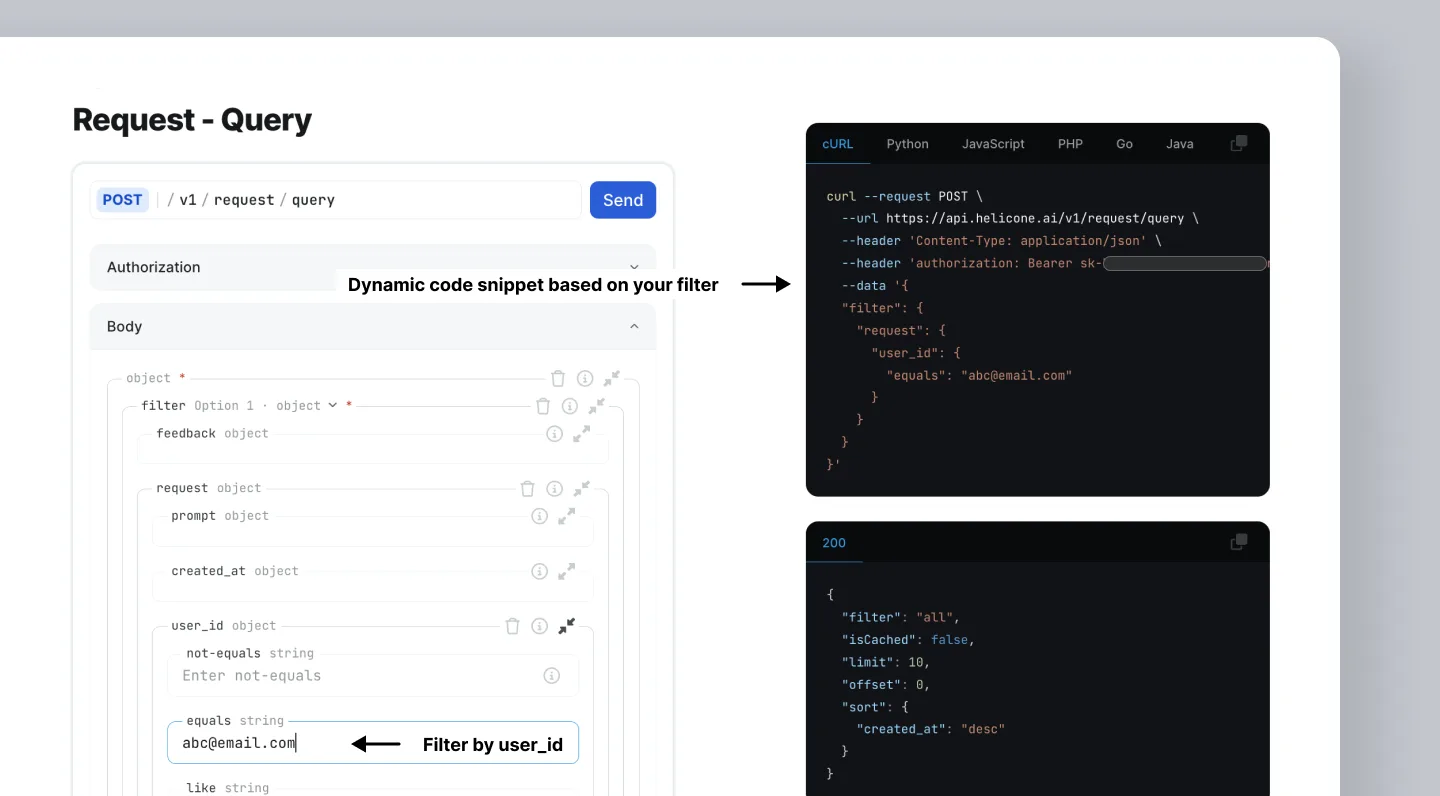
Here's an example to get all the requests where user_id is abc@email.com.
Tip
By using the Request API, the code snippet will dynamically populate on the page, so you can copy and paste.
Adding Additional Filters#
You can structure your query to add any number of filters.
Note: To add multiple filters, change the filter to a branch and nest the ANDs/ORs as an abstract syntax tree.